You can configure agents to watch your repository, read the diff on every pull request, find the coverage gaps the change introduced, and commit the missing Playwright tests to that PR before a human reviews it. In this live demo, MuukLabs CTO Renan Ugalde shipped two features — a login redesign and a new dashboard — without hand-writing a single test, then used a second agent to separate real defects from environment noise in the failures.
Key takeaways
-
Tests can arrive with the PR, not after it. A Test Generator worker reads the code changes, identifies what's newly uncovered, and pushes the tests to the PR branch automatically.
- The bottleneck was never writing scripts. It's the gap between shipping a feature and having coverage for it — a gap that widens every time the team is busy.
- Volume of tests isn't the metric that matters. Renan's example: a 700-test regression suite with 200 failures. When nobody can triage 200 results, the team ships anyway and defects reach production.
- Failure triage is its own job. In the demo, the agent classified a batch of failures as an environment error, not an application bug, named the branch, and reported that 7 test cases were affected.
- Coverage work can start before the commit. A VS Code integration brings the same generation and gap analysis into the editor, ahead of any PR.
Why do tests always lag behind the code?
Because the work has always been sequential. You ship the feature, then someone writes the tests — in review if you're disciplined, and often not at all.
LLMs made writing the script fast, but they didn't remove the bottleneck. Someone still has to stop, decide what's uncovered, prompt for it, check the result, and commit it. That's still a person interrupting their work, which means it still gets deferred.
The shift-left approach Renan demonstrated removes the person from the loop entirely: you configure the trigger once, and the coverage work happens on every push whether anyone remembers it or not.
How does an agent write tests for a pull request automatically?
By reading the diff, comparing it against existing coverage, and committing the missing tests to the PR branch.
Demo one: a login screen redesign. Renan ran the existing authentication suite on main first: 31 Playwright tests, all passing. Then he branched, and vibe-coded four new components into the login flow: sign up, remember me, magic link, and a cookie banner. The existing tests no longer covered any of it.
He pushed the branch and opened a PR containing only application code and no tests.
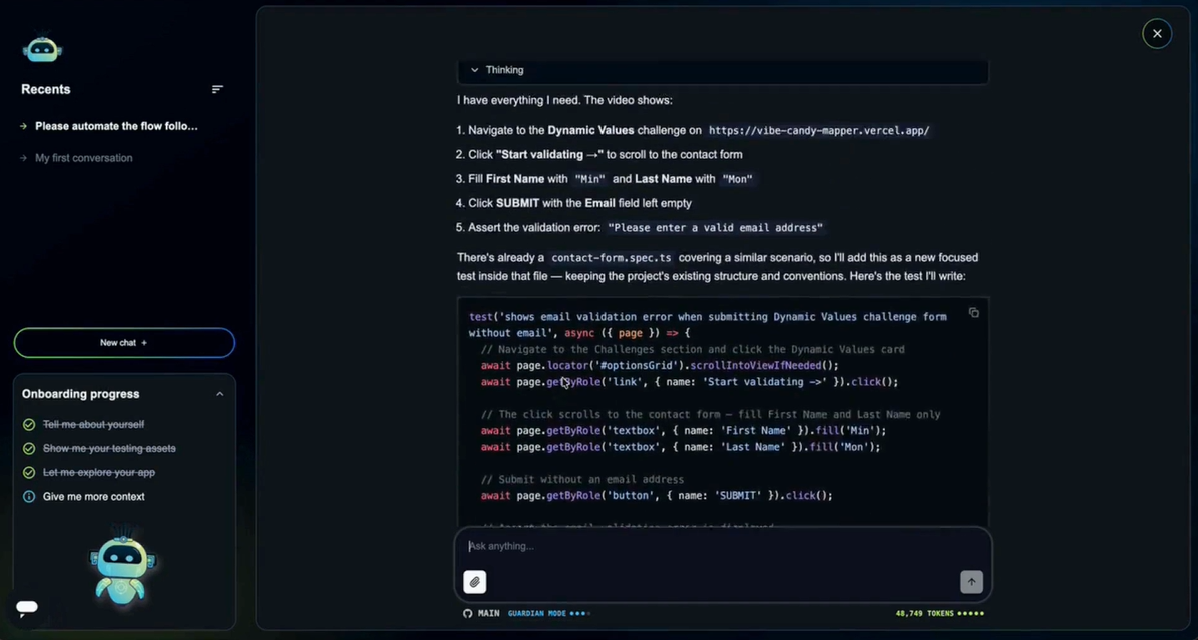
Amikoo picked up the event, analyzed what the change introduced, and pushed a new commit to the PR with the tests for the new components. Renan didn't write one.
Demo two was a bigger case: an entirely new executive dashboard replacing the old one, with forecasting and allocation components. The old dashboard tests failed against it, as expected. Same flow: open the PR, and the missing coverage arrives as a commit.
The point isn't that AI can write a Playwright test. It's that no human had to decide it was time to write one.
How do you tell a real defect from an environment failure fast?
By making triage an agent's job instead of a person's.
This is the problem Renan spent the most time on, and it's the one that quietly kills trust in a suite:
You have 700 tests. 200 fail. Some are selectors, some are environment, some are real. Nobody has time to open 200 results — so the team ships anyway.
In the demo, the dashboard suite threw a batch of failures. Renan asked Amikoo to classify them. The agent pulled the run data, the execution video, and the failure context, and came back with a verdict: an environment error — not a test bug, not an application bug — traced to a URL pointing at the wrong branch, affecting 7 test cases, with the next step spelled out.
That's the difference between 200 red results and one actionable sentence. And it's what a Defect Logger worker uses to decide whether a failure is worth filing as a GitHub issue and pinging the team on Slack — so the notifications you get are the ones that mean something.
What are Workers, and which ones ran in this demo?
Workers are background agents you configure once around a trigger (a PR opening, a test failing, a run finishing) that then act without anyone filing a ticket.
Three ran during the session:
-
Test Generator — watches for a PR, reads the diff, writes the missing Playwright tests, commits them to the branch.
- Defect Logger — confirms a failure is a real defect before filing it as a GitHub issue and notifying Slack.
- Auto-Fixer — takes the issue and repairs the affected test.
Renan also described the pattern most teams set up first: a scheduled run that emails a daily digest — everything's green, or here's what broke. A Worker can be built around any repeatable QA job you want off your team's plate.
Can I generate tests before I even commit?
Yes, that's what the VS Code integration is for.
The last segment previewed Amikoo embedded directly in VS Code, walked through on the same dashboard branch. From inside the editor, with access to the terminal and the working tree, find the coverage gaps for these changes and write the tests. It produced roughly 13 test cases in the project folder, ready to run locally, with the option to generate a coverage report as PDF or HTML.
The split is straightforward. The GitHub integration is for teams that want the safety net at the PR. The VS Code integration is for developers who don't want to wait that long.
Automate the Whole Process
Amikoo is a purpose-built AI QA agent system that analyzes your codebase, user flows, and test reports to find coverage gaps and generate tests in Playwright TypeScript — readable code committed to your own repo, that your team owns and runs wherever it already runs tests.
It works with GitHub and Azure DevOps repositories today, with Bitbucket coming. Migrating from Cypress or Selenium to Playwright? Amikoo can help with that migration.
New to this series? Start with our first webinar recap: Why LLM Test Automation Breaks at Scale.
Watch the full session above, and try Amikoo free at qa.amikoo.ai
FAQ
Can AI write the tests for a pull request automatically?
Yes. An agent can be configured to trigger when a PR opens, read the code changes in the diff, compare them against your existing test coverage, generate the missing tests, and commit them to the PR branch before human review — with no prompt from a developer. This is what Amikoo's Test Generator worker does: you configure the trigger once, and every subsequent PR arrives with its missing Playwright TypeScript tests already committed.
How do you triage hundreds of failing tests without reviewing each one?
A person can diagnose any single failure. The problem is doing it 200 times before a release. Amikoo consolidates the run data, execution video, and failure context for every run, then reports the failure type (application defect, test issue, or environment error) along with how many test cases are affected and the recommended next step. In this webinar's demo, Amikoo correctly identified a batch of failures as an environment error caused by a URL pointing at the wrong branch, affecting 7 test cases. Its Defect Logger worker uses that classification to decide whether a failure is worth filing as a GitHub issue.
Where do AI-generated Playwright tests actually run?
Wherever you want them to. Amikoo commits the tests to your repository as standard Playwright TypeScript, so you can run them through GitHub Actions or any CI/CD provider, locally on a developer machine, or on a dedicated test-execution server. You can also run them directly in the Amikoo app, which consolidates the results, execution videos, and failure context in one place. The code is readable and your team owns it either way, so running it in Amikoo is a convenience, not a dependency.
Can I generate tests inside my IDE, before committing?
Yes. Amikoo's VS Code integration analyzes your working changes in the editor, identifies coverage gaps, and writes the tests directly into your project folder so you can run them locally before pushing — instead of waiting for the PR.
How is this different from asking Claude Code to write tests?
Test creation quality can be comparable if you follow best practices. Amikoo's agents are tuned for QA specifically, which makes generation faster, but that's not the key differentiator. The difference is that with Amikoo, you can automate the whole process: the PR trigger, coverage gap analysis, committed tests, failure classification, defect filing, repair, and reporting, connected as one system. A general-purpose coding agent produces an isolated artifact when you ask for it. Workers run the process when you don't.
Full Webinar Transcript
Webinar: From IDE to Merge — Every PR Arrives With Its Tests Written
Speaker: Renan Ugalde (CTO & co-founder, MuukLabs)
Renan: Hello everyone, thank you for joining. We have a very special topic today: we're going to talk about how you can create test cases at the same pace that you're developing new features.
We're very excited about how AI has enabled us to deliver this value to our customers, so we're looking forward to sharing how you can easily configure things so that every PR you submit already has its test cases.
If we go back in time, this has always been a bottleneck. There's always a gap between submitting a new feature — making any code change — and the time it takes to get the test cases created. AI and LLMs have moved everything so fast that you can now develop test cases quickly, but you still have that bottleneck, because you still need to spend the time.
By automating the whole process, you enable a real shift-left approach: every time you push new code changes, you can actually see that everything is working. You make sure you have coverage, and you can identify failures proactively — at the same pace you're developing your code.
So today there are no slides. It's going to be hands-on. We're going to look at code, and I'm going to run some exercises to show how this works.
Let me switch over. First, I'm using Amikoo — a platform that builds the complete test automation framework. I've already set some things up: I have my repository, so I have access to my GitHub, Slack, email — everything is connected. I didn't have to spend much time building skills or anything; it's set up already.
In this shift-left approach, we've seen two main goals from our customers.
The first: when I submit a PR, I want to make sure I have the right coverage — and if I don't, I want the test cases created and everything running. Basically, having a QA assistant writing the test cases for the feature while you're writing the feature.
The second: every time a test case fails, I want it to flag what the real defects are. We've seen in the past that you might have hundreds of test cases, run them, and everything looks good — but you still have defects in production. So the number of test cases running may not be as important as where you're testing, and whether you can flag and identify the defects that are coming in.
A good example: you run your test cases and suddenly, out of a 700-test regression suite, you have 200 failing — whether it's a selector, a real failure, or an environment issue. Because of these kinds of failures, developers tend to say, "let's just ship it," because they don't have time to go through every single test case. With Amikoo you can actually classify them and say, "these are my real defects."
Renan: So what I'm going to show in this demo are two automation processes I have configured.
The first: I have a PR, and I'm using a vibe-coded application — I call it RestaurantOS, basically a CRM for restaurants. Every time I submit a PR, Amikoo is going to review the code changes, write any missing test cases, and add them directly to the PR. So every time I push a new feature — whether it's a minor change or a complete new feature — that happens.
On top of that, when there's a failure, I want it to create a GitHub issue and send me a notification via Slack, so I'm aware of what's going on, and consolidate everything in the PR. And if I receive an issue, I want it to automatically figure out what's missing and fix the test case.
Just by having these three different automation processes, everything runs at the same speed that I'm developing.
So let's go back to writing some code. I have this application called RestaurantOS — a CRM-based app. Let's say the login doesn't look good, or the marketing team is telling me I'm missing the cookie banner and the sign-out has to work a different way. So I have to make some changes here.
First, let's make sure everything runs. I'm going to run all the test cases tagged as authentication, which is basically my login. These are running Playwright scripts. I just want to make sure everything is passing — this is my main branch, nothing has changed so far. You can see here that we have 31 test cases already passing.
Now let's switch to a different branch — a branch that's going to have the new login. Okay, so I'm on the new login branch.
I'm going to vibe-code this. I'm going to say: I need to redesign, I'm going to add new components such as sign up, remember me, magic link, and add a cookie banner.
This is going to take a few seconds to vibe-code the application. Remember, I ran the test cases and they passed, because my application was running. After these changes are done, I'm going to run the test cases and I expect them to fail. Then I'm going to submit those code changes as a PR — and that's when Amikoo is going to create the test cases for it.
Renan: While we wait for the application — one of the questions we receive is whether Amikoo works with existing repositories. It works with GitHub and Azure DevOps repositories, and we're going to release Bitbucket support. The idea is that you can integrate your existing environment. Whether you already have test cases in Playwright, or you're considering migrating from, let's say, Cypress or Selenium to Playwright — by integrating the repository, Amikoo can help migrate and have those test cases.
Another thing: since we're on Playwright, you get the benefit of running in parallel, and you have agents to help you repair test cases when they fail. So you have a variety of tools you can run.
Okay, it looks good. Let me run the environment locally. Now you can see the different components — sign in, sign out, magic link. These are things that weren't there before.
So for now I'm going to push the changes to my branch. You can see there are some application changes. I'm pushing the changes.
Now I have a new branch with the new changes, so I'm going to switch to my repository in GitHub. As you can see: new login, the branch that was just created. If I compare, I can see the changes — this is just the app changes, nothing else. You can see the commit: cookie banner and everything we just introduced.
I'm going to create a PR here. As you can see, the only code change is the application — the function for the cookie banner that was vibe-coded, the things that were introduced. But remember we configured Amikoo to make sure everything is running.
You can see now that it's running. Amikoo got the event that there were changes in the application, and right now what it's doing is understanding what the coverage gaps were. We introduced new components — sign up, remember me, the cookie banner — so now you'd expect more coverage in the test cases. And I haven't written any test case at all. What I expect is that any changes to my coverage and the test cases will be pushed to my pull request automatically.
Let me switch. Here you can see it automatically created something new — it added a new branch and a commit. You can see the changes. Again, this was automatic; I didn't have to do anything. We added new coverage.
Now if you submit this PR you can easily see that everything is running, and you can merge to main or leave it in this branch. If I go to this branch now, you can see the test cases were added. Let me do a fetch — and I can see there were many changes introduced. You can see what was written by Amikoo automatically. We don't have to do anything.
Renan: That's one example. Another one is when you have more of a real feature that you want to make sure is covered. For that, I'm going to switch to another branch.
In this case, the team told me the current dashboard isn't ideal — we need to create a new dashboard. Let me run it so you can see how it looks. This is main, just to have a comparison. And now the new feature I've developed is this one. As you can see, there are way more components — we have the forecast, the allocations. So many things were added. This is a new feature.
Now I'm going to run the test cases for the executive dashboard, and I expect this will fail — these are test cases that were written for main, and I've just switched to a new feature.
I'm going to run them and I expect most of them will fail. And you'll see here that the test cases that are failing actually did something wrong: I selected the wrong URL. Let me fix that, because we need to point to the current one.
I'm going to rerun this. Now you can see these cases start to fail, because they're covering things that aren't supposed to be there.
As the test cases fail, I know that if I submit a PR the new test cases will be written. So that's what I want to do next. I'm going back to my pull request in GitHub, and I'm going to create a new PR and select the executive dashboard branch.
Here you can see the only change is the application code changes that apply to my dashboard. I'm going to submit that. Now we expect Amikoo will run, handle this as a new feature, and incorporate all the changes into the repository.
Renan: While we wait — you can see test cases passing and failing. Let me switch to Amikoo, because something I want to show you is that in Amikoo we consolidate all the information. Every time test cases fail, you can see the information about what's going on. You can see which branch we ran on, and you can actually play the video and see what happened.
And you can ask Amikoo to classify, based on the latest failures, the type of failure. Amikoo will run the tools to identify whether it looks like a defect or just a temporary issue, and help you proceed with the next steps. We have internal tools that gather all the information and tell you exactly what to test.
You can see it took a few seconds, and it tells you there was an environment error — not a test bug, nor an application bug. It's something related to the URL. It can tell me about the branch, that seven test cases were affected, and the type of error. So it looks to be something new — which we know is actually true — and it will tell you what to do next.
Now I want to show you the test cases that are being created. Again, I submitted a PR, and now I have the test cases here, automated. Pretty much, I just pushed my new feature and now everything is there.
All this information — coverage gaps and so on — can be shared via Slack or email. You can generate a report and be constantly monitoring. One of the most common automations we've seen in terms of monitoring: customers want the execution to run at a certain time every day, and they just want to receive an email saying everything looks good, or here are the defects. You can set that up easily using Workers.
Renan: The last piece: so far we've been talking about PRs — GitHub PRs. However, there's something before the PR. We're delivering a Visual Studio Code integration where you can have Amikoo embedded into VS Code, and now you can run all these test cases and this exercise prior to the commit or the push to the repo.
To do that, I'm going to stop sharing my screen and switch the screen share over, and I'll walk you through the exercise.
[Screen share switches for the VS Code walkthrough]
Here we're going to be on the same branch we were with the new feature — the executive dashboard. Now you have Visual Studio Code with everything embedded. So you can say: let's create a branch, let's include the new code changes for the dashboard, let's find the coverage gaps, and make sure the test cases are created.
The same experience we were having on the web is now embedded into Visual Studio Code. You can see it has direct access to your terminal. It's going to understand what the changes were and create test cases for you. On top of that, it will help you navigate any coverage gaps and tests that are failing or need maintenance — all embedded in Visual Studio Code, before anything is committed.
The GitHub integration is great for PRs. This is for when you don't want to wait for the PR — you want to do it before the commit. The plugin will tell you where all the test cases are. This is building test cases: remember, in the first part we didn't have the test cases and we waited for the PR, and now Visual Studio Code is the one creating them. You can see it created a good amount — it looks like 13 different test cases, written directly to the folder. These are test cases that are ready to go, and it took a few seconds.
From here we can even send a report. You can ask: tell me what the new coverage is, generate a PDF or HTML file, and execute locally. You'll see all that experience now embedded into Visual Studio Code.
Renan: I don't know if anyone has any questions — you can post them in the chat. I think we're running out of time, but we still have a few minutes for some questions.
Q: How do you execute the test cases?
The test cases are part of your repository, so you can run them as part of GitHub Actions or any CI/CD provider. You can run them locally. You can have a specific server that just runs the test cases. It's quite flexible.
Q: How does Amikoo generate the test cases?
We've trained Amikoo using 56 different tools and seven different agents that are able to identify and work as a QA assistant. It works with different LLMs in order to hit specific goals — goals like finding coverage gaps, following guidelines, making sure you're using the Page Object Model. We've embedded good practices for test automation, and that's basically how it's trained.
Q: What's the difference between doing this with Claude?
I think this is an important part. When we compare test creation, Amikoo is better, and the feedback we've received is that the speed of creating test cases is a bit faster, because we've trained the agent to behave that way. Claude is great, and any other LLM is great, but we're using them for a specific purpose.
However, the big differentiator comes from the automation of the whole process. Now you can have everything connected, from your GitHub PR to sending a report and flagging defects. These are different subsystems — not just an isolated artifact that creates a single test case. That's where we've seen the difference: our customers see the value in the complete test process, instead of just test creation. I think that's the biggest difference.
As you can see, it took a few minutes — no more than five — and Amikoo was able to create the test cases. Locally you can see the test cases running, and you'll see the results. In 30 minutes we were able to automate PRs, integrate with GitHub, and use Visual Studio Code to create test cases before they're pushed to the repo.
Renan: Just as a wrap-up: Amikoo is a good alternative if you're looking to automate the whole process. You can give it a try — you have a free account, so you can sign in. The page is qa.amikoo.ai.
Happy to have any conversation, and if you have any questions, please feel free to reach out to Amikoo and to me at renan@muuklabs.com.
All right — I appreciate this time, I hope it was very helpful, and I'm definitely looking forward to the next webinar. Thank you, have a good one.